



Claude
→ Devad MCP builds
Choose a template. Add your data once. → Keep your business running for months.You or your agent. Devad MCP does the heavy work—90% cheaper, faster.
→ Devad MCP builds
· Build & edit
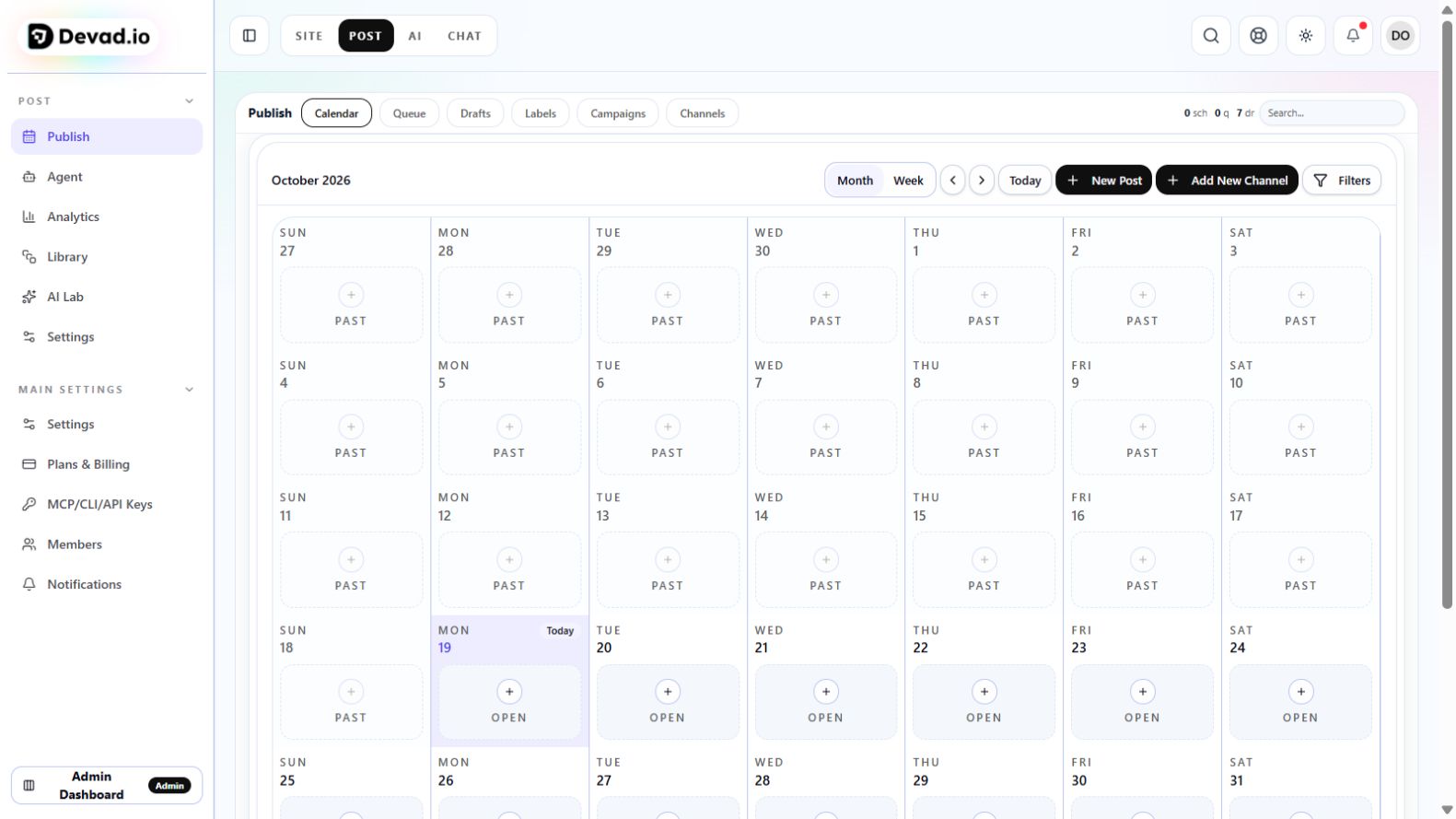
POST App: Schedule posts & articles in a calendar or automate publishing for a month in a few minutes.
Use arrow keys, Home or End to choose a feature. Press Enter or Space to expand it.
Review scheduled posts, queued work and drafts in one calendar.
Prepare media and captions for selected channels, then review each network preview before saving or publishing.
Group posts around a campaign, objective and internal notes.
Save named captions and reuse the wording for your next post.
Organize workspace media with folders, search and sorting.
Connect social profiles, pages, messaging destinations, blogs and CMS channels from one publishing workspace. Formats depend on the destination.
Connect n8n, Make, Zapier or your AI agent using a workspace API key. Dry-test and validate payloads before live writes.
 Facebook
 Instagram
 YouTube
 TikTok
 LinkedIn
 Pinterest
 Telegram
 Google Business
 Bluesky
 Discord
 Slack
 WordPress
 Ghost
 OpenCart v3
 Dev.to
 Mastodon
 Listmonk
 Hashnode
 Medium
 Tumblr
 Article Webhook
CHAT App: Unified customer inbox, CRM task & Team Chat, reviewed chatbot knowledge and your Help Center.
Use arrow keys, Home or End to choose a feature. Press Enter or Space to expand it.
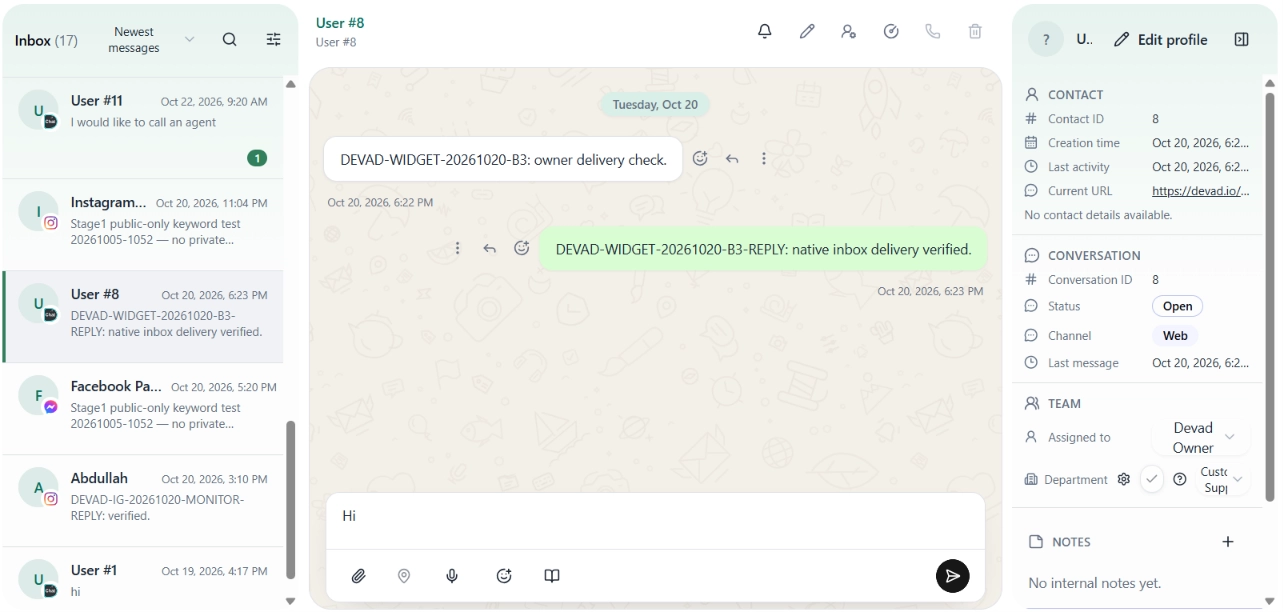
Read customer messages alongside contact details, assignment and private team notes. Reply through the selected conversation channel.
Assign follow-up work with priorities, dates, watchers and linked leads or conversations. Keep task discussion private to the team.
Design message steps, conditions, delays and department routing in a visual canvas. Review and publish the saved revision before customer automation.
Prepare Files, Website, Q&A and Information sources. Review saved knowledge and approve its website audience separately.
Create customer documentation, step-by-step guides, blog posts and changelogs with categories, images and tables.
Bring supported messaging accounts, email, live chat and support tickets into the workspace. Manage each connection and its settings.
Prepare message templates with language, category and variables. Review provider approval and the live preview before use.
Choose an approved template and eligible recipients, including reviewed CSV input. Saved consent and opt-out checks govern marketing sends.
Configure the website widget, welcome experience, office hours and channel settings. Preview changes before saving the selected website.
Give customers a Help Center entry point to sign in, raise a support ticket and follow up with your team.
Import public products for reviewed chatbot knowledge.
Bring your chatbot and Help Center knowledge into voice conversations.
Narrow conversations by status, channel and tags.
Reuse reviewed answers, then personalize each reply before sending.
Set a welcome message and choose when your website chat opens.
 WhatsAppFacebookInstagramTelegramYouTubeGoogle Business
 Email
 Live Chat
 Tickets
 Viber
 WeChat
 Zalo
 Zendesk
 XSlack
 LINE
 Calendar
 WordPress / WooCommerce
 Shopify
 OpenCart
 Magento / Adobe Commerce
 Salla
 Zid.sa
 Manual CSV
SITE App: Build landing pages, business websites and stores with a visual editor.
Use arrow keys, Home or End to choose a feature. Press Enter or Space to expand it.
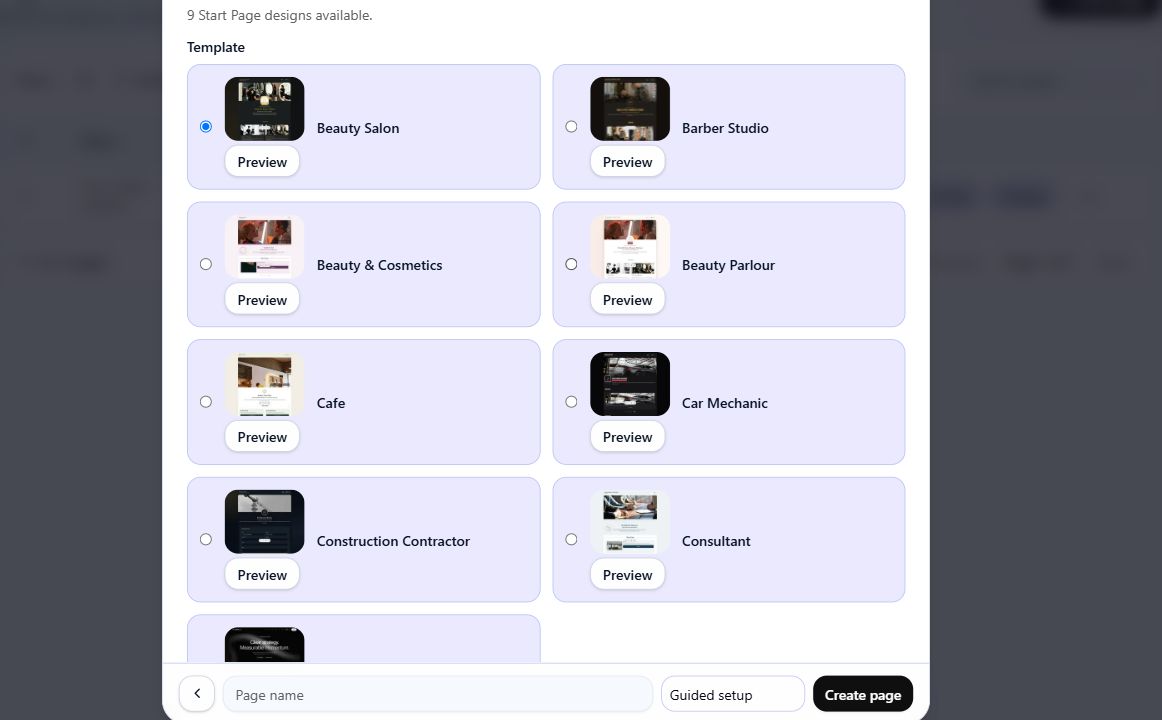
Preview a business design, then adapt its content for your page.
Arrange blocks, edit content and save a private page draft.
Update product details, images and prices in your store.
Choose contact fields and required details for your enquiry form.
Review orders, delivery status and saved invoices. Inspect incomplete order submissions when recovery is enabled and the visitor consents.
Set your timezone, duration and available slots, then receive appointment requests in Activity. This example needs its availability configured.
Present your experience, education, skills, portfolio and contact options in a personal website.
Prepare blog drafts with an authorized AI agent and review them before publication. Shown: the Prompt Atlas content-library template.
Create a wedding website with your story, ceremony details, schedule and guest information.
Present products, images, prices and bundles in a storefront. Review checkout settings and saved orders before launch.
Build a branded landing page with visual sections, clear calls to action and business-specific content.
AI AGENT: Automate bulk content, images & ads for your business.
Use arrow keys, Home or End to choose a feature. Press Enter or Space to expand it.
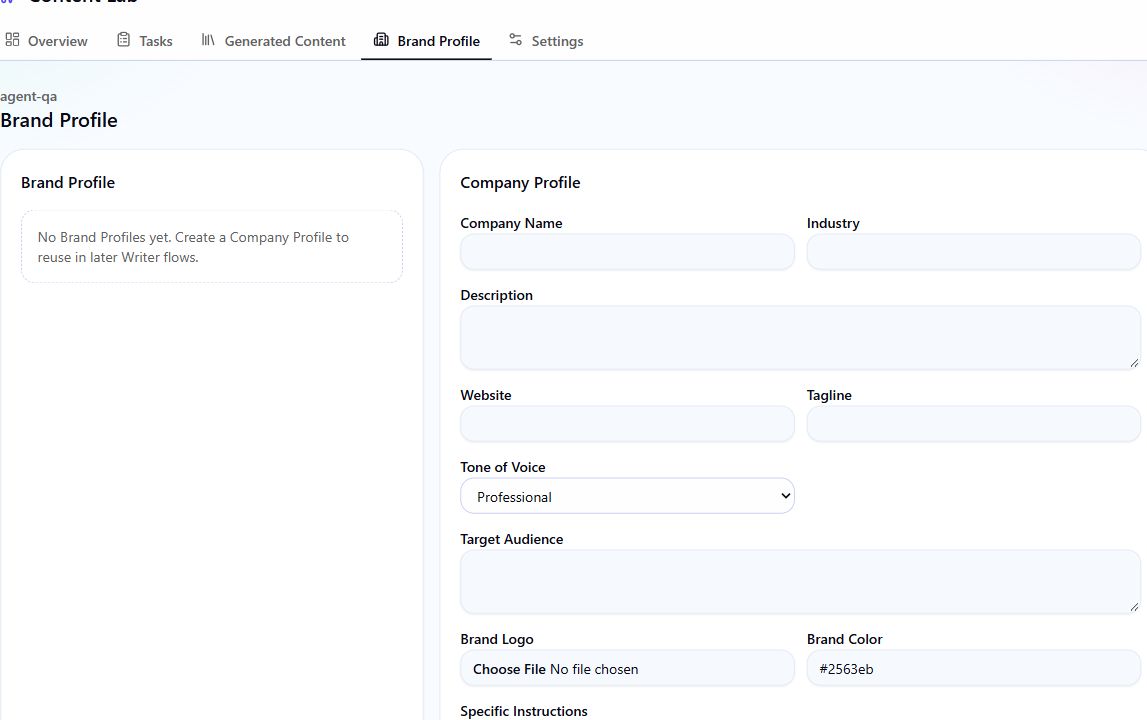
Reuse company, audience and product context across content tasks.
Set the brief, assignee and reviewers together in one task.
Create images in bulk by autofilling reusable templates with your data—using the familiar template-to-image workflow seen in Canva, Templated, Placid, Contentdrips, Snapshark, IMG.LY and Pikstrapi.
Arrange text, images and layers before exporting your design.
Build segment rules and review account signals.
Compare Ads and stock coverage before approving changes.
Review your connected property reports and the selected period.
Review page performance and distinguish lab results from field data.
 Claude
 Codex
 Cursor
 OpenClaw
 Hermes Agent
 n8n
 Agent Zero
 Make
 Zapier
 NanoClaw
 ZeroClaw
 Manus AI
Publish across channels, bring conversations together, and connect your content and AI workflows.
 WhatsAppCustomer messaging
 InstagramDMs & Comments
 FacebookDMs & Comments
 Live ChatWidget & PWA
 SMSText Messages
 EmailTicket Pipeline
 TelegramBot Integration
 TicketsHelp Desk
 WordPressNative pluginShopifyStore connectionWooCommerceProduct syncMagentoStore connectionCSVImport & ExportSallaSaudi e-commerceZidSaudi marketplaceFacebookPublishing connectionInstagramPublishing connectionYouTubePublishing connectionTikTokPublishing connectionLinkedInPublishing connectionPinterestPublishing connectionTelegramPublishing connectionGoogle BusinessPublishing connectionBlueskyPublishing connectionDiscordPublishing connectionSlackPublishing connectionWordPressPublishing connectionGhostPublishing connectionOpenCart v3Publishing connectionDev.toPublishing connectionMastodonPublishing connectionListmonkPublishing connectionHashnodePublishing connectionMediumPublishing connectionTumblrPublishing connectionArticle WebhookPublishing connection
 ClaudeMCP & API agents
 CodexCLI automation
 CursorIDE agent workflows
 OpenClawOpen agent runtime
 Hermes AgentAgent orchestration
 Zero AgentLightweight agents
 n8nWorkflow automation
 MakeNo-code flows
 ZapierApp connectors
 AlternativeToListing pending
 Startup StashListing pending
 Dodo Payments IndexListing pending
 G2Public profile
 CapterraPublic profile
 GetAppListing pending
 Product HuntPublic profile
 UneedComing soon
 SourceForgePublic profile
 PeerSpotListing pending
 PeerlistPublic profile
 CrunchbasePublic profile
 GetLatkaListing pending
 What Launched TodayListing pending
 YourStoryListing pending
 HashnodePublic profile
 StackSharePublic profile
 Active Search ResultsListing pending
 CompareCampListing pending
 LinkCentreListing pending
 Code.MarketListing pending
 StartupsLabListing pending
 SideProjectorsListing pending
 FutureToolsListing pending
 BetterLaunchListing pending
 AI DirectoriesDR 10 required
 LaunchLlamaListing pending
 GravatarPublic profile
 SmolLaunchComing soon
 TinyLaunchComing soon
 Feed My StartupListing pending
 PeerPushListing pending
 LaunchIgniterListing pending
 VerifiedDRPublic profile
 Twelve ToolsBadge pending
 MarketingDBBadge pending
 CodeHypeBadge pending
 FazierBadge pending
 ToolPilotBadge pending
 Startup FameBadge pending
 Good AI ToolsBadge pending
 TinyHuntBadge pending
 Smol SaasBadge pending
 AiTop10 ToolsBadge pending
 Starter BestBadge pending
 The One StartupBadge pending
 Days LaunchBadge pending
 SaaSFameBadge pendingWordPress
 Wix
 HubSpotZapier
 SquarespaceZendesk
 Hootsuite
 Semrush
 Elementor
 Webflow
 Buffer
 Intercom
 Pipedrive
 FramerMake
 Jasper AI
 Latern8n
 Chatwoot
 Postiz
Choose an app, then explore the section that matters to your business.
35 matching features
 CHATInbox
Review conversations and coordinate team replies.
CHATInboxOrganize conversation states, tags and assignments.
CHATInboxRoute support work to the right team.
CHATCRMKeep contact context alongside your conversations.
CHATCRMReview lead records and their next steps.
CHATCRMTransfer supported contact data with reviewed mappings.
CHATWhatsAppReview provider setup and connect an eligible business number.
CHATWhatsAppPrepare approved templates and respect messaging windows.
CHATWhatsAppReview provider health and connection restrictions.
CHATWhatsAppUse reviewed product information in supported conversation flows.
CHATFacebookConfigure eligible Page messaging with required permissions.
CHATInstagramReview comment and messaging workflows for supported accounts.
CHATChannelsConfigure a bot and review the channel setup.
CHATLive ChatInstall and configure the website welcome experience.
CHATChatbotPrepare knowledge sources before testing chatbot answers.
CHATChatbotControl when the team takes over from AI.
CHATFlow BuilderConfigure conversation steps and explicit handoff paths.
CHATWebsite SyncReview connector readiness and import structured product knowledge.
CHATHelp CenterCreate and organize docs, guides and support knowledge.
CHATHelp CenterMaintain reviewed answers to common questions.
CHATAutomationReview enabled automation and its preconditions.
CHATTeamSet roles and permissions for your workspace team.
 AI AGENTContent Lab
Reuse business and audience context across content tasks.
AI AGENTContent LabConfigure a task and assign reviewers.
AI AGENTContent LabChoose links, keywords or other supported source types.
AI AGENTContent LabImport and maintain the rows behind content runs.
AI AGENTContent LabSet generation limits and review consent before running.
AI AGENTContent LabEdit generated content and save reviewed changes.
AI AGENTContent LabPass approved content into the publishing workflow.
AI AGENTImage LabStart with an editable layout and adapt its content.
AI AGENTImage LabCreate images in bulk by autofilling reusable templates with your data—using the familiar template-to-image workflow seen in Canva, Templated, Placid, Contentdrips, Snapshark, IMG.LY and Pikstrapi.
AI AGENTImage LabArrange, hide and lock design elements.
AI AGENTImage LabPlace a screenshot in a supported scene.
AI AGENTImage LabReview proposed changes before applying them.
AI AGENTImage LabReview available formats and download your result.
AI AGENTAds LabConfigure rules and review the unpublished result.
AI AGENTAds LabRead product-level signals and unknown values.
AI AGENTAds LabCompare advertised products with available stock.
AI AGENTAds LabReview intended changes without overwriting account labels.
AI AGENTAds LabSchedule only configured and ready workflows.
AI AGENTSEO LabReview clicks, impressions and search performance.
AI AGENTSEO LabReview saved website checks and scope limits.
AI AGENTSEO LabDistinguish page lab analysis from field data.
AI AGENTSEO LabInspect a URL and save a review draft.
 POSTPublishing
Review scheduled posts, queued work and drafts in one calendar.
POSTPublishingPrepare captions and media, then check each destination preview.
POSTPublishingGroup posts around a campaign, objective and internal notes.
POSTPublishingSave named captions and reuse the wording for your next post.
POSTPublishingOrganize workspace media with folders, search and sorting.
 SITEBuilder
Preview a business design, then adapt its content for your page.
SITEBuilderArrange blocks, edit content and save a private page draft.
SITEBuilderUpdate product details, images and prices in your store.
SITEBuilderChoose contact fields and required details for your enquiry form.
SITEBuilderReview received order items, totals and status in Activity.
SITEPagesChoose a design and adapt it to your business.
SITEPagesChoose a Start Page or Pro Site workflow.
SITEStoresCreate an editable store from an approved template.
POSTChannelsReview the supported connect a telegram channel to post workflow.
POSTChannelsReview the supported connect a youtube channel to devad post workflow.
POSTChannelsReview connection prerequisites, permissions and the supported publishing workflow.
POSTChannelsReview connection prerequisites, permissions and the supported publishing workflow.
POSTChannelsReview connection prerequisites, permissions and the supported publishing workflow.
POSTChannelsReview connection prerequisites, permissions and the supported publishing workflow.
POSTChannelsReview connection prerequisites, permissions and the supported publishing workflow.
POSTChannelsReview connection prerequisites, permissions and the supported publishing workflow.
POSTChannelsReview connection prerequisites, permissions and the supported publishing workflow.
POSTChannelsReview connection prerequisites, permissions and the supported publishing workflow.
POSTChannelsReview connection prerequisites, permissions and the supported publishing workflow.
POSTChannelsReview connection prerequisites, permissions and the supported publishing workflow.
POSTChannelsReview connection prerequisites, permissions and the supported publishing workflow.
POSTChannelsReview connection prerequisites, permissions and the supported publishing workflow.
POSTChannelsReview connection prerequisites, permissions and the supported publishing workflow.
POSTChannelsReview connection prerequisites, permissions and the supported publishing workflow.
POSTChannelsReview connection prerequisites, permissions and the supported publishing workflow.
POSTChannelsReview connection prerequisites, permissions and the supported publishing workflow.
POSTChannelsReview connection prerequisites, permissions and the supported publishing workflow.
POSTChannelsReview connection prerequisites, permissions and the supported publishing workflow.
POSTChannelsReview connection prerequisites, permissions and the supported publishing workflow.
POSTChannelsReview connection prerequisites, permissions and the supported publishing workflow.
POSTChannelsReview connection prerequisites, permissions and the supported publishing workflow.
POSTAutomationConfigure ready workflows and keep approval boundaries explicit.
POSTLibraryOrganize workspace assets for the next publishing task.
POSTAI & agentsReview AI output before it enters a publishing workflow.
POSTAutomationUse the documented Sheets integration and inspect its outputs.
POSTAutomationConnect an authorized automation client to supported POST actions.
POSTAI & agentsPrepare an approved client and the required workspace access.
POSTAI & agentsReview the supported client transport and access boundaries.
SITEBlogEdit article content and review the saved revision.
SITEBlogPrepare article content for your store.
SITEPublishingPrepare your domain and hosting before publication.
SITEPublishingPrepare a saved export and inspect it before publishing.
SITEPublishingPublish through an authorized hosting connection.
CHATTeamChoose staff alert recipients and review delivery settings.
CHATPlatformChoose reader and interface languages without assuming automatic translation.
CHATHelp CenterConfigure navigation, branding and customer support links.
CHATHelp CenterReview saved content and website delivery separately.
CHATHelp CenterMaintain docs, guides and articles with reviewed changes.
CHATHelp CenterReview public discovery files and reader navigation.
CHATCustomer SupportConfigure departmental handling for the support team.
CHATCustomer SupportPrepare team access and agent settings.
CHATWhatsAppConfigure a supported 360dialog channel and review provider prerequisites.
CHATWhatsAppConfigure an eligible sender without treating sandbox access as production readiness.
CHATWebsite SyncReview connection and product knowledge import controls.
CHATWebsite SyncReview Shopify product knowledge setup.
CHATWebsite SyncReview OpenCart connection and import settings.
CHATInboxLeave colleague-only context beside a conversation without sending it to the customer.
CHATInboxReuse approved answers while checking the latest customer question and channel.
CHATInboxFind the conversations that need attention using status, snoozed state, channel and tags.
CHATInboxReview customer context and team assignment without leaving the selected thread.
CHATCRMAssign an owner, priority and start or end date to each follow-up task.
CHATCRMConnect a task to its lead or conversation so the team can recover the context.
CHATCRMKeep collaborators informed through the task’s team discussion and watcher controls.
CHATCRMOrganize work in administrator-configured columns and switch between board and row views.
CHATChatbotChoose Files, Website, Q&A or Information to match your approved business material.
CHATChatbotRead the extracted content before importing a training file; keep the original safely.
CHATChatbotImport one public HTTPS page and review its saved text before customer access.
CHATChatbotChoose a page from a sitemap XML document.
CHATChatbotKeep a saved source staff-only until its content and intended website audience are approved.
CHATChatbotReview changed text and its indexing state before renewing website availability.
CHATFlow BuilderArrange message steps and routing logic on a connected canvas.
CHATFlow BuilderPrepare different paths and waiting steps for the conversation journey.
CHATFlow BuilderRoute a conversation toward the appropriate team through a registered integration.
CHATFlow BuilderReview the saved draft and required resources before publishing an automation revision.
CHATWhatsAppPrepare language-specific header, body and button substitutions before provider review.
CHATWhatsAppCheck the message body and supported media in a phone-style preview before use.
CHATWhatsAppPrepare approved-template outreach for eligible recipients with saved consent and opt-out controls.
CHATWhatsAppReview selected conversations, pasted numbers or CSV input against the selected phone’s eligible recipients.
CHATLive ChatReview settings and appearance for the selected connected website.
CHATLive ChatSet the welcome experience and displayed office hours without confusing them with live agent presence.
CHATHelp CenterPrepare headings, ordered steps, links, tables and images in the shared content editor.
CHATHelp CenterChoose the content type that fits a reference, walkthrough, article or product update.
CHATHelp CenterOrganize support content into categories and a logical learning sequence.
CHATHelp CenterCheck the saved revision and public audience before publishing a customer answer.
CHATCustomer SupportLet customers sign in through the Help Center and track a support request.
CHATWebsite SyncInspect accepted and rejected products, actual variants and unknown facts before publication.
CHATWebsite SyncUse the six listed store connectors or a reviewed Manual CSV for product knowledge.
CHATWebsite SyncSelect the approved current catalog before asking the chatbot about a SKU or variant.
CHATChatbotBring chatbot knowledge into voice conversations through your website widget.
PreviewSITEStoresReview orders, delivery status and saved invoices. Inspect incomplete order submissions when recovery is enabled and the visitor consents.
SITEPagesSet your timezone, duration and available slots, then receive appointment requests in Activity. This example needs its availability configured.
SITEPagesPresent your experience, education, skills, portfolio and contact options in a personal website.
SITEPagesPrepare blog drafts with an authorized AI agent and review them before publication. Shown: the Prompt Atlas content-library template.
SITEPagesCreate a wedding website with your story, ceremony details, schedule and guest information.
SITEStoresPresent products, images, prices and bundles in a storefront. Review checkout settings and saved orders before launch.
SITEPagesBuild a branded landing page with visual sections, clear calls to action and business-specific content.
No features match this selection. Choose another section.
Plan your workspaces, connections and setup with confidence.
Create a separate workspace for each client or brand. Devad includes unlimited workspaces, so you can organize each team’s content, conversations and settings in its own space.
Yes. Connect multiple WhatsApp numbers, email inboxes and social profiles in the same workspace, and manage them together. Choose the account capacity that fits your business.
Yes. We offer setup and training, including one free hour with a plan purchase of $100 or more, whether you choose monthly, annual or lifetime billing.
Yes. Prepare your content once, adapt captions for each connected channel and schedule the campaign from one publishing calendar.
Yes. Annual billing changes how often you pay while keeping the same core feature access. Choose the payment schedule that fits your business and compare the current totals on the pricing page.