MONTHLY
$20.00/Mo
Billed Monthly $20.00
Avg $1.00/acc/mo
Start now19 paid + 1 Free = Accounts (Unlimited Usage)
20 app connections to use however you like in POST, CHAT, SITE or AI.
$20.00/Mo
Billed Monthly $20.00
Avg $1.00/acc/mo
Start now$9.50/Mo
Billed annually: $114.00
Avg $0.48/acc/mo
Start now$232.00/ Pay Once
LTD: $232.00
Limited Time
Start now| Capability | Monthly / Annual / Lifetime |
|---|---|
| Unlimited publishingPlan, schedule and publish from one calendar. | Unlimited |
| Unlimited messagesIncoming and outgoing CHAT messages | Unlimited |
| Unlimited Team TasksAssign, track and finish work together. | Unlimited |
| Unlimited Team ChatPrivate task threads, up to 50 messages per thread. | Unlimited |
| Unlimited workspacesOrganize every brand and client in its own space. | Unlimited |
| Unlimited team membersBring creators, reviewers and responders together. | Unlimited |
| AI training volumeWebsite, PDFs, JSON, XML sitemaps, live agent teaching | Unlimited · pay as you go |
| AI ChatbotSales, support, and onboarding bots on separate pages | Unlimited · pay as you go |
| Languages answeredAutomatic detection with no manual translation | 50+ languages |
| Automation routesMCP/CLI/API, Claude, Codex, N8N, Zapier |             |
| POST social media profilesSocial media publishing across connected profiles. |                      |
| CHAT channelsWhatsApp, Instagram, Facebook, Telegram, email and web chat. |           |
| Connected domainsSave and manage your domains for live SITE pages and stores. | 20 |
| AI usageResearch, draft and create with metered usage. | Pay as you go |
| Website Sync + CSVSync website data into CHAT. |       |
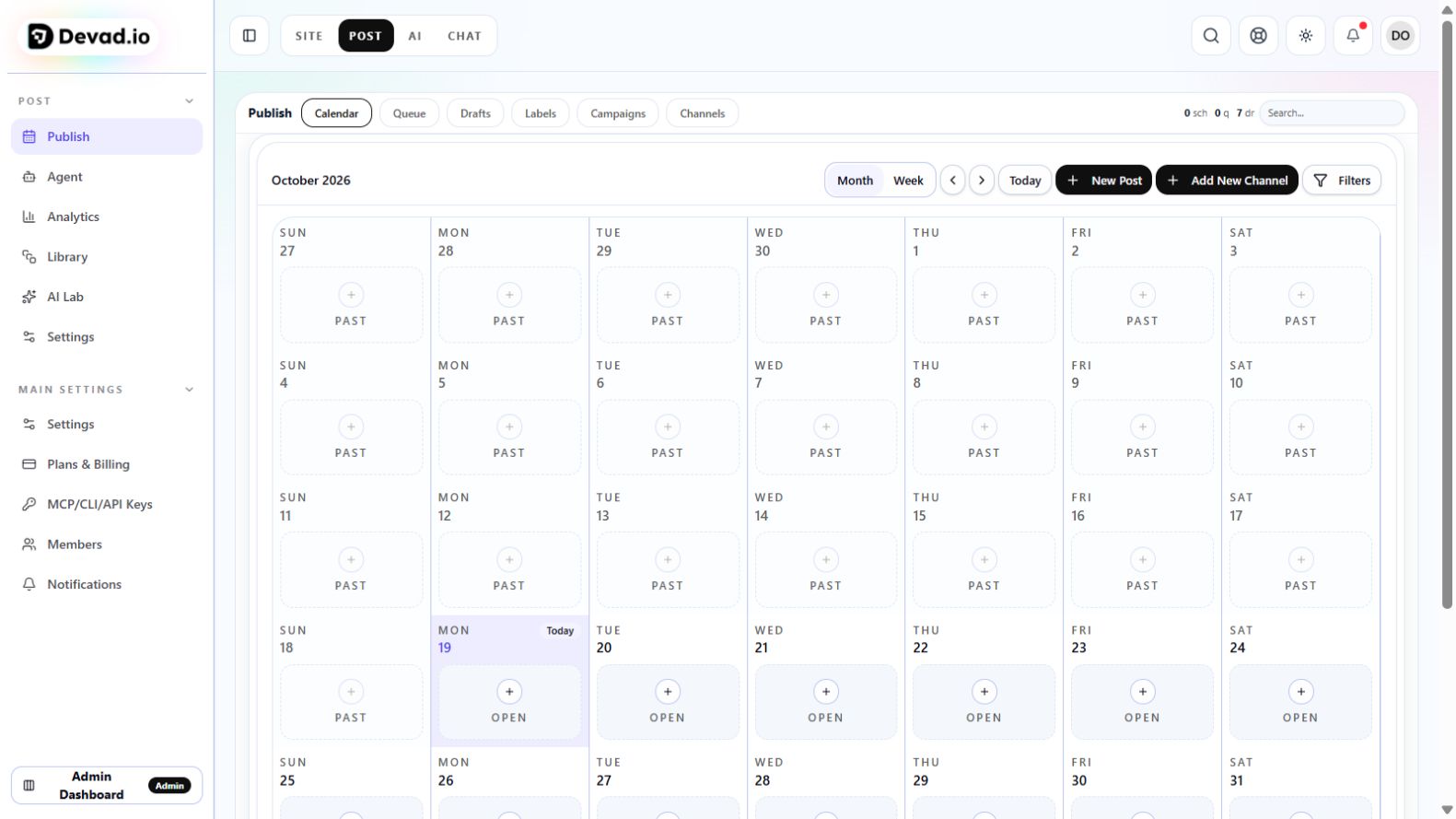
POST App: Schedule posts & articles in a calendar or automate publishing for a month in a few minutes.
Use arrow keys, Home or End to choose a feature. Press Enter or Space to expand it.
Review scheduled posts, queued work and drafts in one calendar.
Prepare media and captions for selected channels, then review each network preview before saving or publishing.
Group posts around a campaign, objective and internal notes.
Save named captions and reuse the wording for your next post.
Organize workspace media with folders, search and sorting.
Connect social profiles, pages, messaging destinations, blogs and CMS channels from one publishing workspace. Formats depend on the destination.
Connect n8n, Make, Zapier or your AI agent using a workspace API key. Dry-test and validate payloads before live writes.
 Facebook
 Instagram
 YouTube
 TikTok
 LinkedIn
 PinterestTelegram
 Google BusinessBlueskyDiscordSlackWordPress
 Ghost
 OpenCart v3Dev.toMastodonListmonkHashnodeMedium
 Tumblr
 Article Webhook
CHAT App: Unified customer inbox, CRM task & Team Chat, reviewed chatbot knowledge and your Help Center.
Use arrow keys, Home or End to choose a feature. Press Enter or Space to expand it.
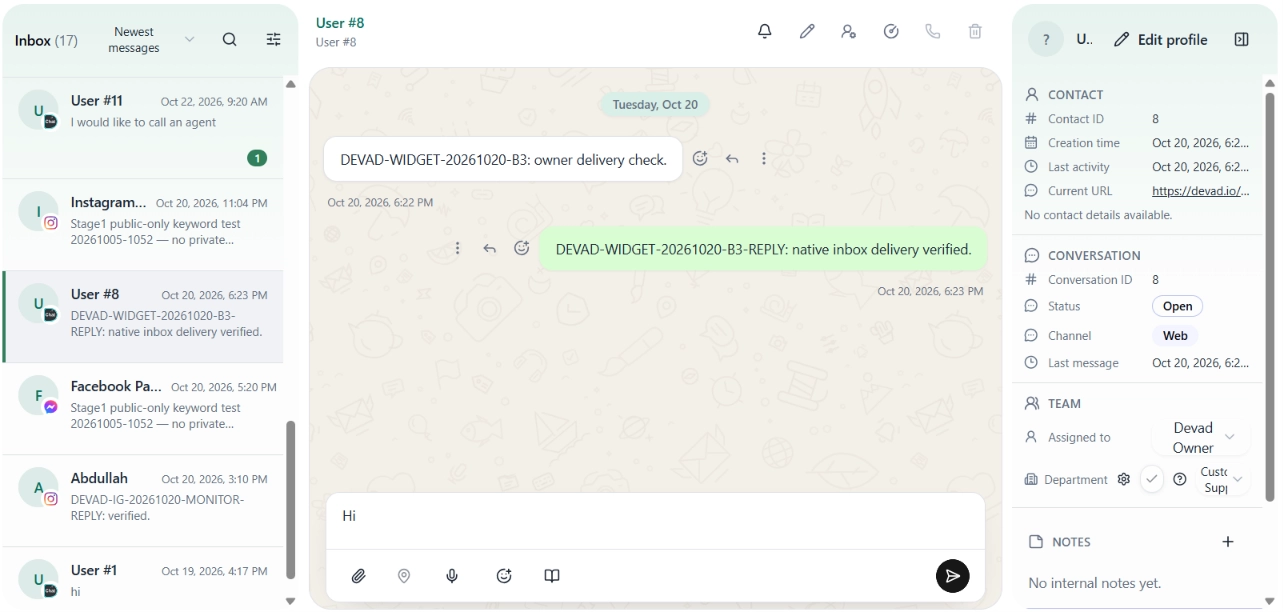
Read customer messages alongside contact details, assignment and private team notes. Reply through the selected conversation channel.
Assign follow-up work with priorities, dates, watchers and linked leads or conversations. Keep task discussion private to the team.
Design message steps, conditions, delays and department routing in a visual canvas. Review and publish the saved revision before customer automation.
Prepare Files, Website, Q&A and Information sources. Review saved knowledge and approve its website audience separately.
Create customer documentation, step-by-step guides, blog posts and changelogs with categories, images and tables.
Bring supported messaging accounts, email, live chat and support tickets into the workspace. Manage each connection and its settings.
Prepare message templates with language, category and variables. Review provider approval and the live preview before use.
Choose an approved template and eligible recipients, including reviewed CSV input. Saved consent and opt-out checks govern marketing sends.
Configure the website widget, welcome experience, office hours and channel settings. Preview changes before saving the selected website.
Give customers a Help Center entry point to sign in, raise a support ticket and follow up with your team.
Import public products for reviewed chatbot knowledge.
Bring your chatbot and Help Center knowledge into voice conversations.
Narrow conversations by status, channel and tags.
Reuse reviewed answers, then personalize each reply before sending.
Set a welcome message and choose when your website chat opens.
 WhatsAppFacebookInstagramTelegramYouTubeGoogle Business
 Email
 Live Chat
 TicketsViberWeChatZalo
 Zendesk
 XSlackLINE
 Calendar
 WordPress / WooCommerce
 Shopify
 OpenCart
 Magento / Adobe Commerce
 Salla
 Zid.sa
 Manual CSV
SITE App: Build landing pages, business websites and stores with a visual editor.
Use arrow keys, Home or End to choose a feature. Press Enter or Space to expand it.
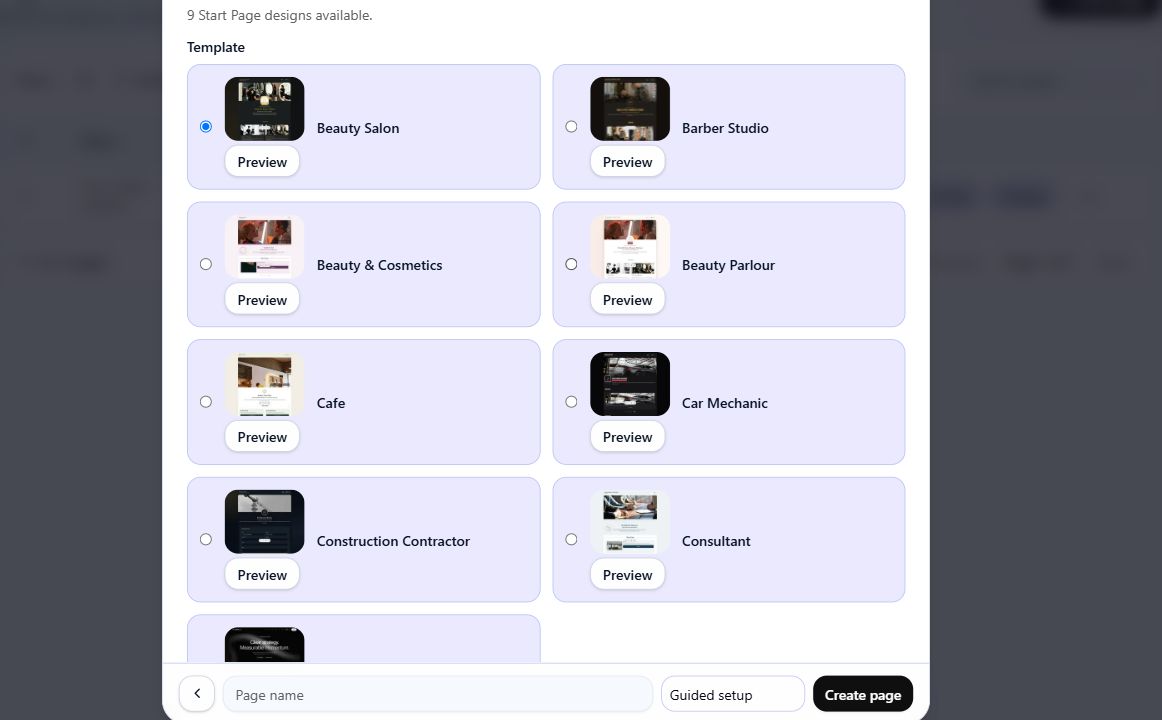
Preview a business design, then adapt its content for your page.
Arrange blocks, edit content and save a private page draft.
Update product details, images and prices in your store.
Choose contact fields and required details for your enquiry form.
Review orders, delivery status and saved invoices. Inspect incomplete order submissions when recovery is enabled and the visitor consents.
Set your timezone, duration and available slots, then receive appointment requests in Activity. This example needs its availability configured.
Present your experience, education, skills, portfolio and contact options in a personal website.
Prepare blog drafts with an authorized AI agent and review them before publication. Shown: the Prompt Atlas content-library template.
Create a wedding website with your story, ceremony details, schedule and guest information.
Present products, images, prices and bundles in a storefront. Review checkout settings and saved orders before launch.
Build a branded landing page with visual sections, clear calls to action and business-specific content.
AI AGENT: Automate bulk content, images & ads for your business.
Use arrow keys, Home or End to choose a feature. Press Enter or Space to expand it.
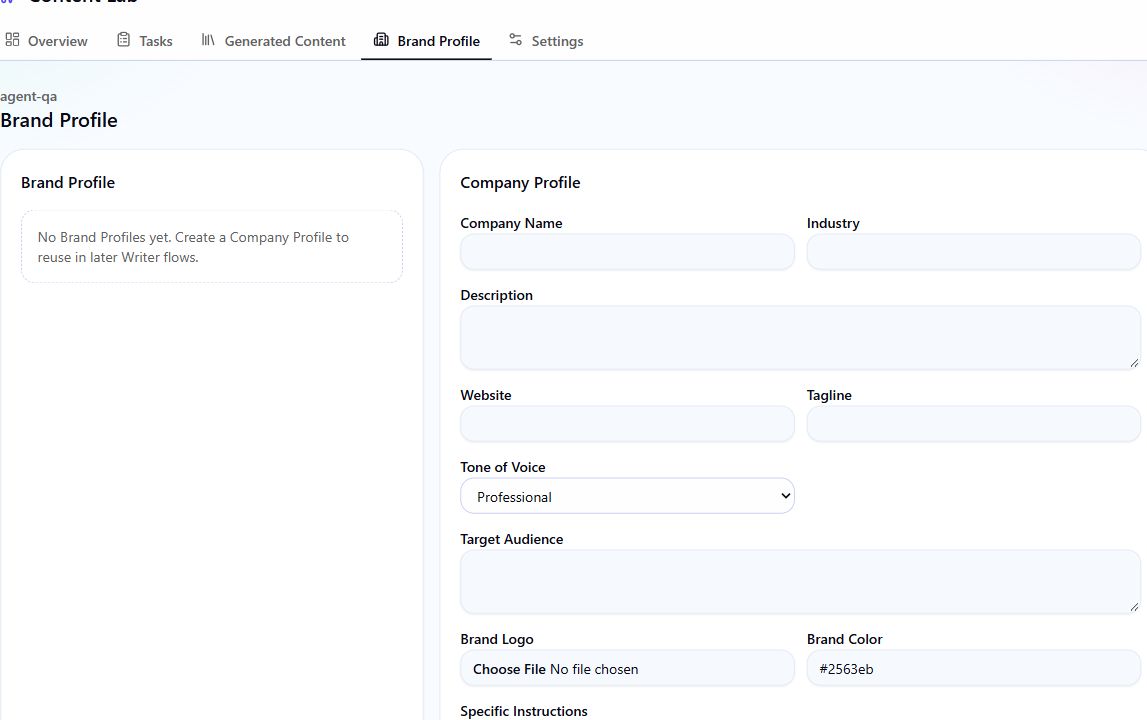
Reuse company, audience and product context across content tasks.
Set the brief, assignee and reviewers together in one task.
Create images in bulk by autofilling reusable templates with your data—using the familiar template-to-image workflow seen in Canva, Templated, Placid, Contentdrips, Snapshark, IMG.LY and Pikstrapi.
Arrange text, images and layers before exporting your design.
Build segment rules and review account signals.
Compare Ads and stock coverage before approving changes.
Review your connected property reports and the selected period.
Review page performance and distinguish lab results from field data.
 ClaudeCodexCursorOpenClawHermes Agentn8nAgent ZeroMakeZapier
 NanoClawZeroClawManus AI
See the tools Devad brings together for publishing, conversations, sites, and automation.
| Features | Replaces | Average cost | Devad includes |
|---|---|---|---|
| SITELanding pages & stores100+ templates. Own domains. | WordPressWixSquarespace | Avg $29/mo*site builder + domain | SITE: builder + connected domainsLanding Pages & WhatsApp Stores. Publish to your hosting via SFTP. |
| POSTSocial publishingSchedule posts. All channels. | BufferHootsuiteLaterPostizBlotatoUpload-PostZernio | Avg $36/mo*Buffer $5 · Hootsuite ~$99 · Later $19 · Postiz $29 · Blotato $29 | POST: unlimited publishingSupported channels, one calendar, paid AIO |
| CHATShared inbox & web chatWhatsApp, social DMs, email. | IntercomZendeskTidioLiveChatHelp ScoutManychat | Avg $23/mo*Intercom $29 · Zendesk $19 · Tidio $24 · LiveChat $19 | CHAT: unlimited messagesUnified inbox, assignment, notes, and handoff |
| AI AGENTBulk AI content & imagesBulk drafts and images. | NeuronWriterSurfer SEOFraseSemrushWritesonicJasper AI | Avg $54/mo*NeuronWriter $23 · Frase $39 · Semrush $60 · Jasper $69; Surfer €49 | AI AGENT: pay as you goResearch, bulk drafts, review, approve, export |
| INTEGRATIONSAgent automationMCP, CLI and API workflows. | ZapierMaken8nComposioPipedream | Avg $19/mo*Zapier $20 · Make $9 · Composio $29; n8n €20 | MCP / CLI / API includedMCP/CLI/API, Claude, Codex, N8N, Zapier |
| ACCOUNTConnected account coverageOne shared connection pool. | Separate seatsChannel billing | Avg $15/mo*social media publishing + chat + domain | One flexible connection poolUse connections in any app, with no fixed split. AI connections count; AI usage is pay as you go. |
| WORKSPACETeams & channelsUnlimited teams, workspaces. | Extra seatsWorkspace add-ons | Avg $25/mo*seat + workspace + channel tiers | Unlimited team membersAIO includes unlimited workspaces |
| AI AGENTReview & approvalReview, approve and export. | Unreviewed automation | Avg $15/mo*team approvals + workflow add-ons | Human approvalReview, approve, rewrite, and export |
| Cheapest Alternative | WordPressWixHubSpotZapierSquarespaceZendeskHootsuiteSemrushActiveCampaignElementorWebflowBufferIntercomPipedriveClickFunnelsSprout SocialMakeJasper AILaterUnbounceKeapHelp ScoutManychatFramerLiveChatTidioClickFunnels 2.0n8nSysteme.ioVendastaSurfer SEOWritesonicFraseChatwootPipedreamLightfunnelsNeuronWriterComposioOnepageBlotatobundle.socialDoublescaleGrowtheonPlanvortexPostizPostpeerPostproxyReplyKaroSocialAPI.aiSocialClawStartBuddiUpload-PostWoopSocialZernioZoolops | Average costTotal $216/mo* | Devad includes$7.50/mo · Annual + AI pay as you go |
*The total adds the displayed category benchmarks. Alternative prices are compact planning benchmarks from the selected comparison sources; the published offers and limits in the cards above remain authoritative. The $7.50 annual comparison is a fixed illustrative offer, independent of your selected account count.
Answers about free allowances, paid plans, and usage.
1 free on-page SEO check per owning account per UTC day, shared across all workspaces. Then $0.01 per checked page. SEO Review and Site Health share this allowance. Review the maximum price before starting; unused reservations return to the wallet. Saved reports and exports are free. Search Console and Site Performance keep separate quotas.
CHAT customer counts are operational usage records, not an additional paid-plan charge. An enabled Standard free allowance retains its fair limits.
When the CHAT customer allowance is reached, sends to new customers wait for the next UTC month or a plan with more allowance. Incoming messages and conversations with already-counted customers continue. Billable AI actions require sufficient AI wallet balance separately.
Top up from $5 for billable AI usage. Unspent credit stays in your balance. Top-ups do not increase the CHAT customer allowance.
Messages are unlimited, both ways. No separate free plan is enabled. Paid AIO includes unlimited publishing and incoming and outgoing messages. The included 1,000 unique outbound CHAT customers per UTC month are shared across owned workspaces. There are no extra CHAT customer or lead fees. New customers beyond the included allowance wait for the next UTC month or a plan with more allowance; existing customers continue. AI usage is pay as you go; top-ups do not increase the CHAT allowance.
Black Friday bonus accounts belong to your paid selection. The selector shows the total, paid and free account counts. No separate free plan is included.
Monthly is billed each month. Annual is billed once per year. The selector shows the exact current totals and availability.
No. Annual changes the payment pace, not the core feature access. The same core value is available on Monthly.
Lifetime is a pay-once option with no renewal. Pay once and keep the same core feature access.
AI Agents is pay as you go. Start from a keyword, URL, RSS feed, or text, then review and approve the work before export.
One domain per selected account. A saved domain entry uses a slot across your owned workspaces; DNS ownership verification is not required to count it. Each saved domain can be edited once per UTC calendar month. Domain capacity follows your selected account count, including the free allowance. Removing an entry hides it immediately but keeps its slot occupied until the next UTC month.
Yes. You can disconnect accounts when your workload changes. Review your billing settings before changing a paid plan.
Yes. SITE is live. Build landing pages, business websites and stores with the visual editor.
Enterprise
Tell us what you need. We’ll discuss your requirements and custom pricing.
A team behind your account
Get help with setup and training, then hand over your day-to-day account operations.
$35/ hour
After your first free hour$5+/ hour
Ongoing, hands-on managementService fees are separate from your Devad plan and AI usage.