
Guides
Save a Site Health scope and interpret scan coverage
Use AI → SEO Lab → Site Health for a bounded inspection of an approved public website. Saving a scope, queueing a run and completing a scan are separate results.
Access and prerequisites
Confirm the workspace, SEO Lab/Beta availability and your role. An owner or admin with enabled controls can save a scope and request a scan. Beta does not replace membership, AIO access or permission to inspect the website.
A scan also requires an available worker. Run scan or Queued does not prove that a page was fetched. Do not assume that worker setup or a product update means your current scan succeeded.
Save the intended scope
- Open Site Health and check the saved Base URL.
- Open Scan options to review the optional sitemap URL, page limit and allowed path prefixes. Blank prefixes use the base URL path.
- Use a reviewed scope. The current interface caps a scan at 20 pages; that is a page-result limit, not 20 total HTTP requests. Robots files, sitemaps, redirects and failures can add fetches.
- Choose Save scope when editing is enabled and verify the saved state. Save intended scope changes before requesting a scan.
Request, monitor or cancel
- Choose Run scan only when the target, scope and network work are approved and the control is enabled.
- Read the saved run and its status. Queued means waiting, not a successful scan. Running means work is in progress, not that all pages were checked.
- Read checked/discovered counts, findings and errors against that exact run. Partial or limit-reached results cover only checked pages; discovered pages are not automatically checked pages.
- Use Cancel when offered, then verify the resulting state. Closing the page does not cancel a run.
- If a request stays queued or returns no checked pages, ask support to confirm worker availability and the saved state before another request. Do not submit duplicate runs to force progress.
Access changes and interpretation
Queued/running work remains subject to the requester's membership, owner/admin permission, workspace state, app/Beta availability and AIO access. If access changes, further fetching may stop. Ask the owner to resolve access rather than retrying with another identity.
Findings are observations from a bounded capture. They do not prove whole-site health, Google indexing, publication or future rankings. Private/local or credential-bearing targets are not substitutes for approved public pages.
Site Health does not inherit Site Performance's 20-analysis daily pool. A crawl can make several deterministic HTTP requests and is not an AI model run. Confirm its applicable allowance and charge policy separately; no new Site Health fee or tenant quota is established by this guide.
Recover safely
Retain prior useful reports. For failed/partial work, read the error, saved scope and coverage before another authorized run. If submission is uncertain, inspect the existing run before retrying. Correct unsafe targets or unsupported scope through normal controls. A working queue is not proof that a particular scan completed.
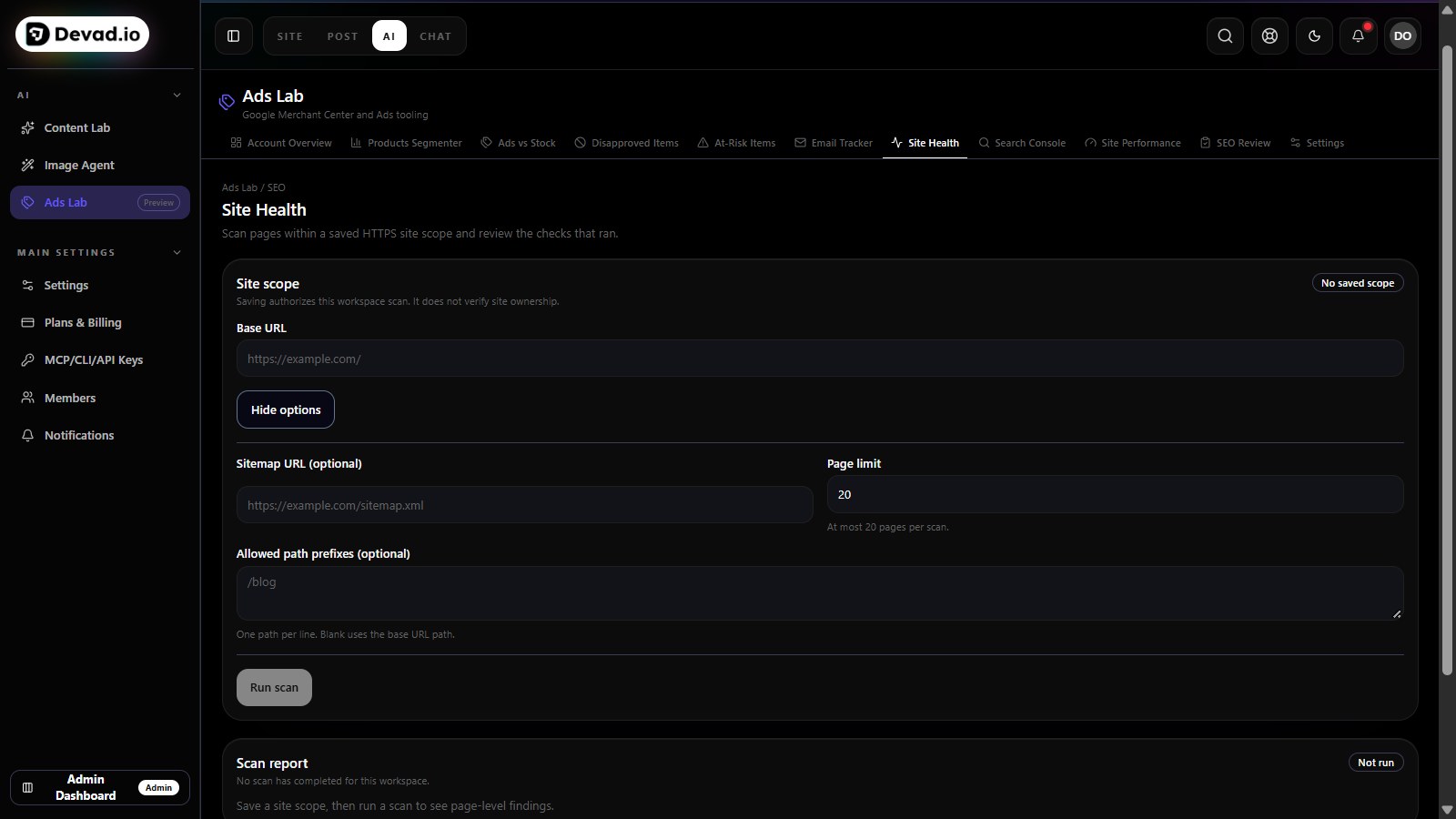
Historical controls, 4 November 2026, Devad Docs QA: expanded Scan options, sitemap/page-limit/path fields and disabled Run scan. Save scope is not visible in this read-only view. This is neither a saved current scope nor successful scan proof.